Cost prices and fallback cost
Where cost of goods comes from, what the fallback percentage does, and how to see what is real and what is estimated.
Where cost of goods comes from
Promoosh uses the cost entered on the product in Shopify (cost per item, excluding VAT). A cost of zero or less counts as missing.
It is always today's cost in Shopify that is used. If you change a product's cost, the new value also applies to older orders — there is no historical cost per order date.
Fallback percentage for cost of goods
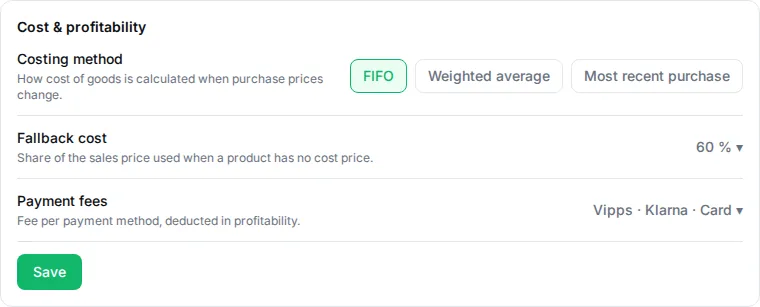
Under Settings → Cost & profitability you can set a fallback percentage. It is only used for sold products that have no real cost, and is calculated as a percentage of the product's current selling price. It is never on by default: without a value from you, the cost stays unknown, and Promoosh does not guess.
The panel also shows how much of the units sold have a real cost, and how much use the fallback percentage.
Costing method
The costing method decides how cost of goods is matched to units sold when several purchase batches have different prices. You choose between FIFO (first in, first out), Weighted average and Most recent purchase price. There is no default — until you have chosen one, the Dashboard asks you to choose a costing method before net profit is shown.
How to see what is real and what is estimated
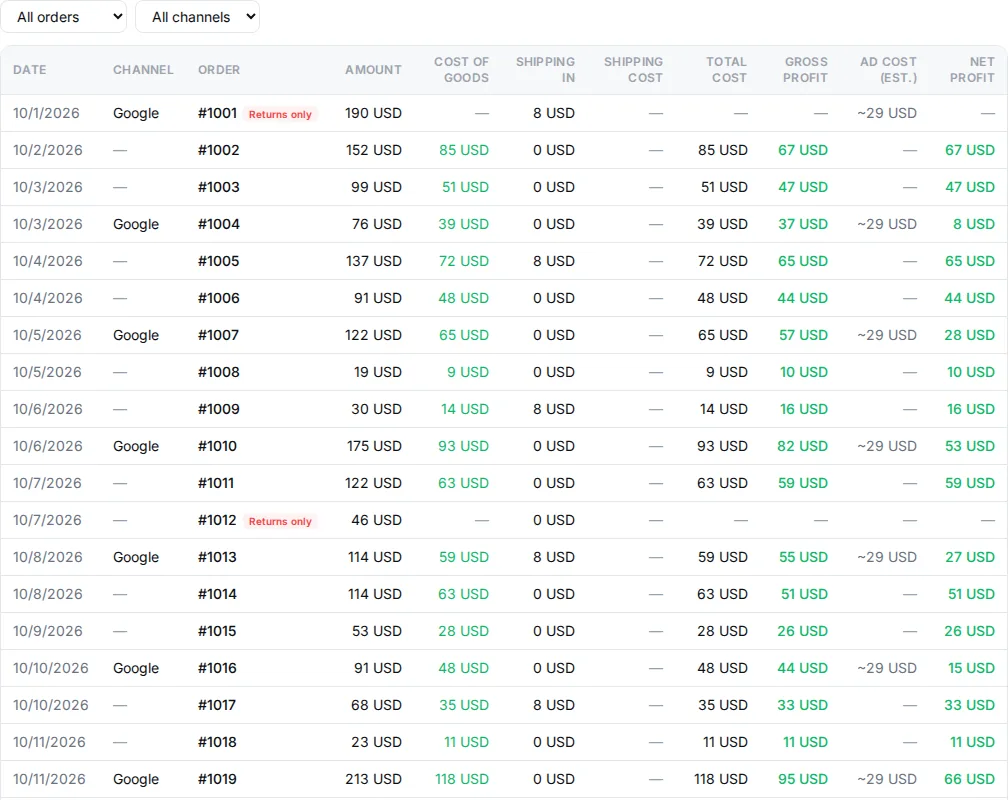
In Orders Overview, the cost column shows whether the figure is “Real cost of goods (invoice/Shopify)” or “Estimated cost of goods (fallback percentage)”. Products without a cost also get no Smart label.
If figures are missing altogether, see Troubleshooting.
Last reviewed 30 October 2026