Available today
Profit and POAS for every store
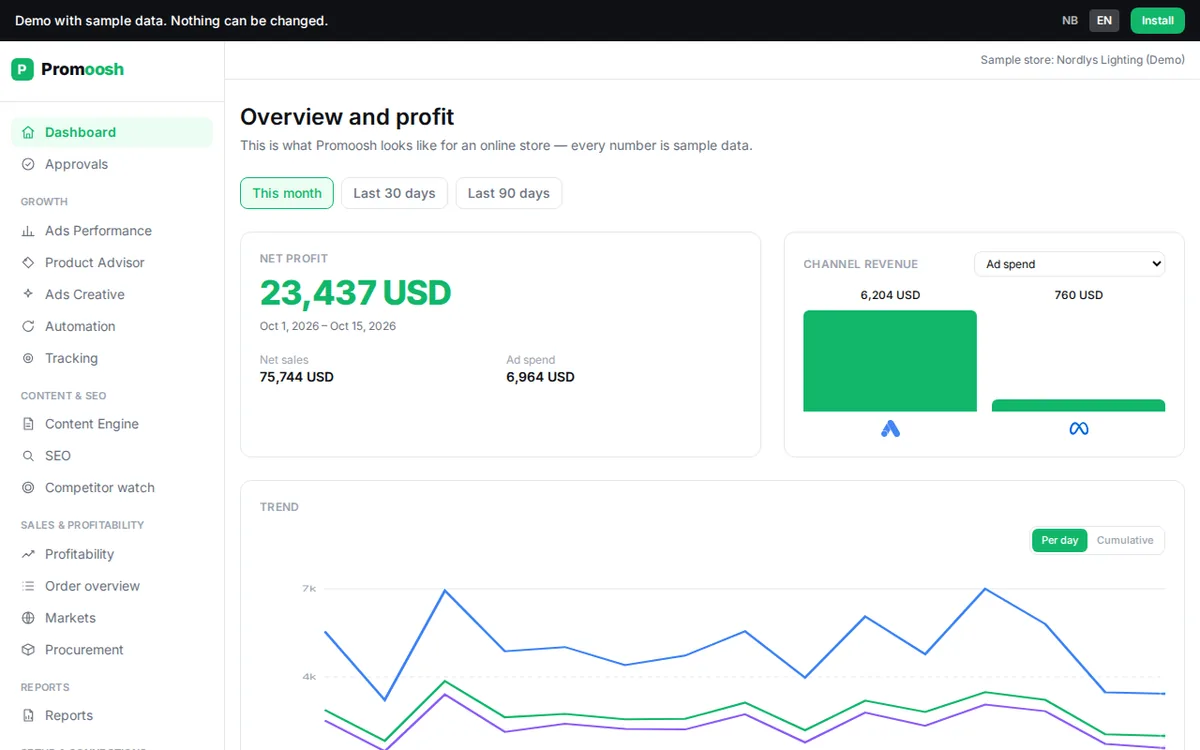
The dashboard shows net result, profit on ad spend (POAS) and the channels for the period, calculated after cost of goods, shipping and ad spend.
For agencies and freelancers
Promoosh connects Shopify, Google Ads and Meta Ads and calculates profit and POAS after cost of goods, shipping and ad spend, per product and campaign. What you show the client can survive a question about the bottom line.
We are building the agency features together with the first agencies.
Real screenshot from the demo: fictional store, sample data.
Agency reality
ROAS says nothing about margin
Ad platforms measure revenue. Clients live on what is left after cost of goods, shipping, fees and ad spend, and that is not in any screenshot from the ad account.
Cost prices in a spreadsheet
Profit per product needs cost prices. When they live in a spreadsheet nobody owns, every report becomes manual work.
Tracking that quietly stops working
A theme change or a new consent banner, and conversions disappear. Often the client is the one who notices first.
Report day eats the week
Export from several accounts, paste, explain the gaps. The time goes into assembling numbers instead of acting on them.
Available today
Each client is connected as its own organization. The screenshots are real, taken from the public demo with a fictional store.
The dashboard shows net result, profit on ad spend (POAS) and the channels for the period, calculated after cost of goods, shipping and ad spend.
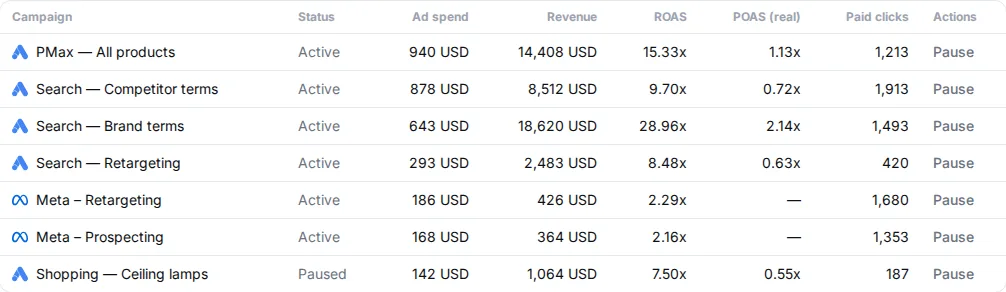
The Product Advisor shows sales, stock, cost of goods and profit per product. Ads Performance shows campaigns from Google Ads and Meta Ads with POAS next to ROAS.
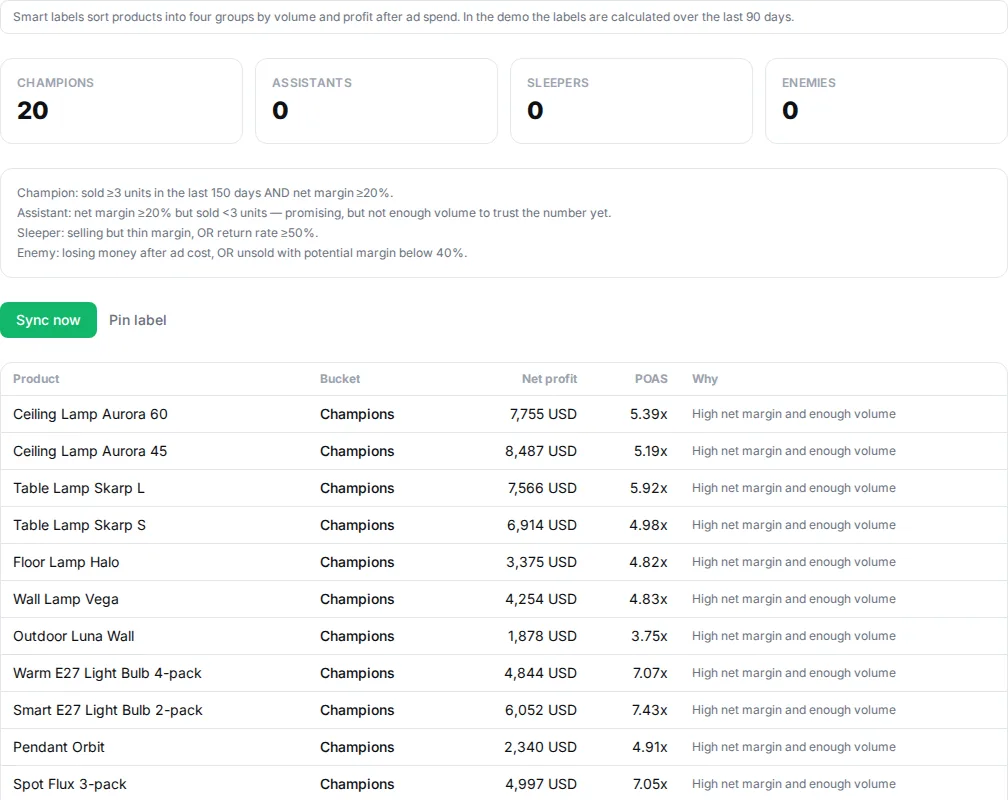
Products are grouped by actual profitability, and the groups are written as custom labels in Merchant Center, ready to use in Shopping campaigns.
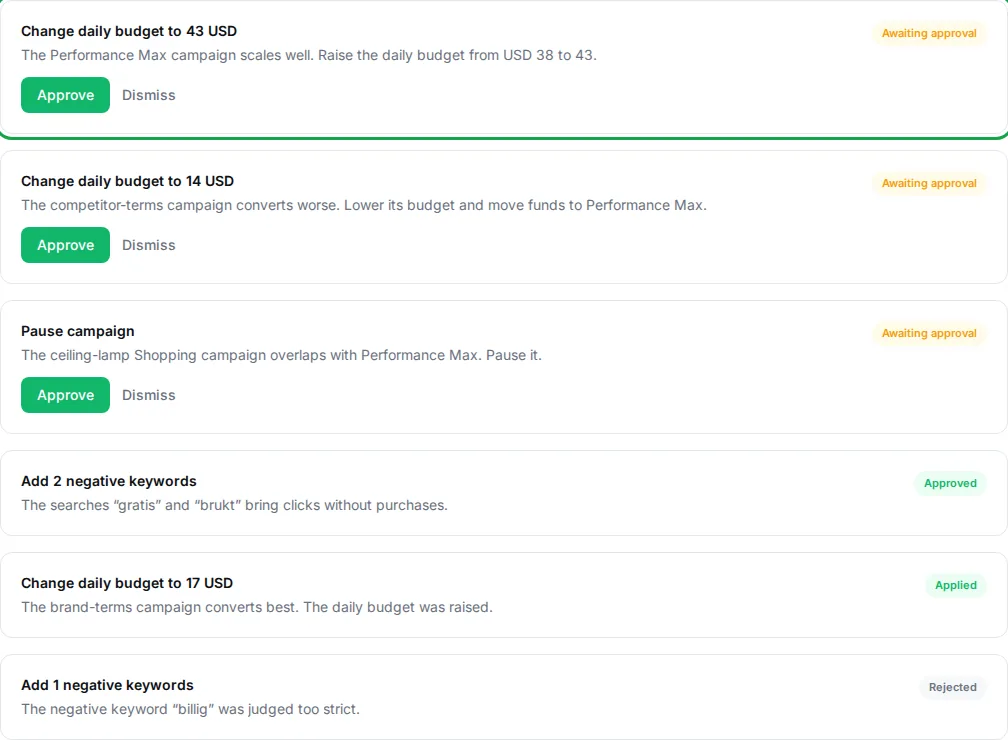
Promoosh proposes bids and exclusions per Smart label group in Shopping campaigns. Nothing changes in the ad account until an owner or admin has approved the proposal.
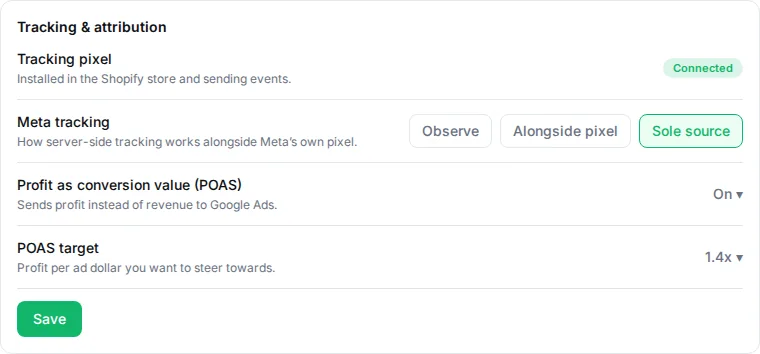
The tracking page shows whether the pixel works and what share of orders has a tracked channel. Server-side conversion forwarding to Google and Meta is in beta and is switched on per account.

Ask about one client's numbers in the app, or in Claude with the read-only MCP connection. If you belong to several clients' organizations, say which client the question is about.
Net sales, gross profit, ad spend and MER per shipping country for the store.
Build the report with the tiles you need and export to CSV. The weekly report is an AI-written summary you create in the app and receive by e-mail.
The client invites the agency by e-mail, and you switch between clients with “Switch organization” in the top bar. Each client has its own connections, numbers and subscription. Invitations grant full access, and a separate read-only access for the client is planned.
Planned, built with pilot agencies
Nothing in this section is in the product today. The sketches show the direction with sample data for a fictional agency, and the order is decided together with the first agencies.
Is meant to bring profit, POAS, ad spend, tracking health and pending approvals for every client into one table, without switching organization. Read-only, so nothing can change in the wrong client account.
Agency overview · Demo Byrå
Profit, all clients
NOK 88,300
Ad spend, all clients
NOK 75,000
Clients
4
| Client | Profit | POAS | Ad spend | Tracking | Pending |
|---|---|---|---|---|---|
| Demo Sykkel | NOK 48,200 | 1.8 | NOK 26,800 | OK | 2 |
| Demo Interiør | NOK 31,500 | 1.4 | NOK 22,100 | OK | 0 |
| Demo Hudpleie | -NOK 4,300 | 0.9 | NOK 15,700 | Check | 1 |
| Demo Turutstyr | NOK 12,900 | 1.2 | NOK 10,400 | Missing | 0 |
Sample data: fictional agency and fictional clients.
Is meant to cover profit and POAS per market for every client store, including clients with more than one store.
Stores and markets
Demo Sykkel
Demo Interiør
Sample data: fictional agency and fictional clients.
Clients will be able to see their own numbers in the dashboard, profitability, reports and ads performance, but not change anything and not see orders with customer data.
Access · Demo Sykkel
The client sees
No orders with customer data, no settings, no approvals.
Sample data: fictional agency and fictional clients.
The agency will be able to create the client's organization, connect the store and ad accounts, set cost prices, check tracking and invite the client in one wizard.
New client store · Demo Turutstyr
Sample data: fictional agency and fictional clients.
Will add the ad level to product and campaign, so you can see which ads make money after cost of goods, not just which have a high ROAS.
Ads · Demo Sykkel
| Ad | Platform | Ad spend | Profit | POAS |
|---|---|---|---|---|
Demo vårkolleksjon – video Demo Prospecting | Meta Ads | NOK 6,400 | NOK 9,800 | 1.5 |
Demo sykkelhjelm – karusell Demo Retargeting | Meta Ads | NOK 3,100 | NOK 5,900 | 1.9 |
Demo Shopping – hjelmer Demo Shopping | Google Ads | NOK 8,200 | NOK 7,100 | 0.9 |
Demo Søk – merkevare Demo Søk | Google Ads | NOK 2,300 | NOK 6,200 | 2.7 |
Sample data: fictional agency and fictional clients.
Templates for a monthly report, a weekly pulse, a product review and a tracking check, meant to work for every client and be adjusted per client.
Report templates
Monthly client report
Weekly pulse
Product review
Tracking check
Sample data: fictional agency and fictional clients.
Reports will carry the agency's logo and colours, so the client meets your agency and not Promoosh.
Client report with the agency's branding
Report for Demo Interiør
1 Sept – 30 Sept
Profit
NOK 31,500
POAS
1.4
Ad spend
NOK 22,100
Prepared by Demo Byrå
Sample data: fictional agency and fictional clients.
You will be able to choose client, template, frequency and recipients, including client contacts who have no user. E-mail comes first, Slack and Google Sheets later.
Report delivery
| Client | Template | Frequency | Channel |
|---|---|---|---|
| Demo Sykkel | Monthly client report | Every month | |
| Demo Interiør | Weekly pulse | Every week | |
| Demo Hudpleie | Weekly pulse | Every week | Slack |
| Demo Turutstyr | Product review | Every month | Google Sheets |
Sample data: fictional agency and fictional clients.
One question about the whole client list, for example which clients are below the POAS target, will be answered with numbers from each client and a clear source. Still read-only.
Ask across clients
Which clients are below the POAS target this month?
These clients are below the target:
Source: each client's own numbers, same period.
Sample data: fictional agency and fictional clients.
Planned for agencies that bring their own clients. Terms are agreed in the meeting.
Partner program · Demo Byrå
Terms are agreed in the meeting.
Sample data: fictional agency and fictional clients.
MCP for agencies
With the MCP connection you ask about one client's numbers in Claude. The connection is read-only, and answers state their period and data source. Examples the tools can answer today:
If you belong to several clients' organizations, you can ask Claude to list them and say which client the question is about.
Meeting and pilot
We are building the agency features together with the first agencies. For your agency that means:
A direct line to us
You talk to the people who build the product.
Influence on the order
What your agency needs first is what we consider building first.
Setup after the meeting
We set up your clients with what exists today and agree on what gets built next.
Pricing and agency terms are agreed in the meeting.
Pricing
99 USD per month
Per store (organization), regardless of the number of users. 10-day free trial via the Shopify App Store.
Agency terms
Agreed in a short meeting.
Questions from agencies
Available today: Dashboard, POAS, Profitability, Product Advisor, Ads Performance, Smart labels, Margin-aware Shopping bids, Approval queue, Tracking, Server-side conversion forwarding, Ask Promoosh, MCP connector for Claude, Markets, Reports, Weekly report, and Team and multiple organizations. Planned, built with pilot agencies: Agency portfolio across all clients, Multi-store rollup, Read-only client access, Client store onboarding from the agency, Profit and POAS per ad, Agency report templates, White-label reports, Scheduled report delivery, AI and MCP across clients, and Partner program. The planned features have no date, and the order is decided together with the first agencies.
Yes. Each client is its own organization with its own connections and subscription. The client invites the agency by e-mail, and you switch between clients in the top bar. A combined overview of all clients is planned.
Each store has the same price as in the Shopify App Store: 99 USD per month, with a 10-day free trial. Agency terms are agreed in a short meeting.
Today a client can be a member of their own organization and see everything there. Invitations grant full access. A separate role where the client can only read is planned.
No. Every change becomes a proposal in the approval queue, and only owners and admins can approve. Whether an approved change is written directly to the ad account depends on write access being enabled for the account.
Today: Shopify, Google Ads, Google Merchant Center, Meta Ads, Fiken, and Claude. Other platforms are listed as planned on the integrations page.
Each client is its own organization, and the database only lets members of the organization reach its data. The MCP connection is read-only. The planned client access is not meant to open up personal data either.
We go through your clients, show what exists today and agree on pricing and terms. A partner program is planned, and its terms are agreed in the meeting.
Book a short meeting, or try Promoosh on one store first.