The approval queue
Promoosh never changes your ad account without you approving the proposal first. Here is how it works.
Promoosh never changes an ad account without you approving the proposal first. Every change — such as pausing a campaign or changing a budget — becomes a proposal that waits for you.
Where proposals come from
- Changes you start yourself in the campaign table in Ads Performance (pause, enable, change budget).
- The AI advisor in Ads Performance and Ads Automation.
- Margin-aware Shopping bids in Ads Performance: bids and exclusions per Smart label group in a standard Shopping campaign, based on actual sales, ad spend and stock.
- Ask Promoosh can turn a request into a proposal, but the proposal still has to be approved.
How to approve
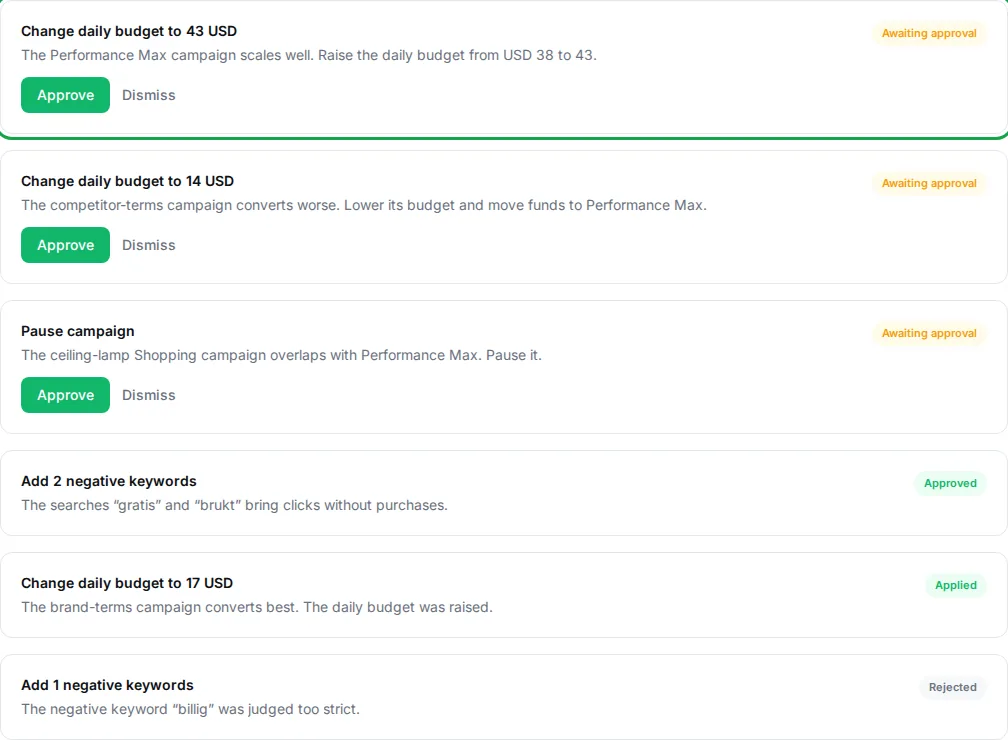
Pending proposals are shown on the Dashboard under “Needs your attention”. Each proposal explains what changes and why. Choose Approve or Dismiss. Only owners and admins in the organization can approve.
The statuses
A proposal goes from “Awaiting approval” to “Approved”, then “Applying”, and finally “Applied” or “Failed”. If it fails, the reason is shown. A dismissed proposal gets the status “Rejected”.
When the change isn't written directly
Whether an approved change is actually written to the ad account depends on write access being enabled for the account. If it isn't, the change is validated against Google Ads and marked as not published live — you then need to make the change yourself in Google Ads.
Claude via MCP cannot approve anything; see Using Claude with MCP.
Last reviewed 30 October 2026